
If you run a service business, you already know the problem. The phone rings while you're on a roof, in a crawlspace, or finally sitting down to dinner. You can't pick up. The caller doesn't leave a message. They call the next name on the list.
An AI receptionist is one way to fix that. It answers the phone for you, day or night, and either helps the caller or gets the right call to you. But there are a lot of them now, they work differently, and they cost anywhere from a couple dozen dollars a month to a couple thousand.
Full disclosure: we sell an AI receptionist (Gary) at Viralux. This guide tells you how to choose the best AI receptionist for your small business. It includes other companies' published prices, and it says plainly when another option fits better than ours.
What an AI receptionist actually does (and doesn't)
An AI receptionist is software that answers your business line with a natural-sounding voice. Callers talk to it the way they'd talk to a person. Behind the scenes, it follows the information and rules you gave it. Here's what that looks like in practice.
Answers 24/7 from your real business info
A good one answers from your actual services, service area, hours and common questions, the way you'd want them said. Nights, weekends and holidays included. If you only send it half the story, it'll only give callers half the story, so the quality of the setup matters as much as the technology.
Takes the lead details when it can't help
When a caller wants something the AI can't answer, it should capture the basics: name, phone number, and what they need. Then it gets that to you quickly.
Transfers the calls that need you (live transfer)
This is the feature most owner-operators care about most. Some calls can wait until morning. Others can't: a burst pipe, a roof leak during a storm, an AC that died in August. A good AI receptionist can send those calls straight to your cell phone, or to someone on call, while the caller is still on the line.
What it can't do
It can't close the sale for you, and it shouldn't guess at prices it was never given. Think of it as the person who answers, helps with what it knows, and hands off the rest. It isn't a replacement for you.
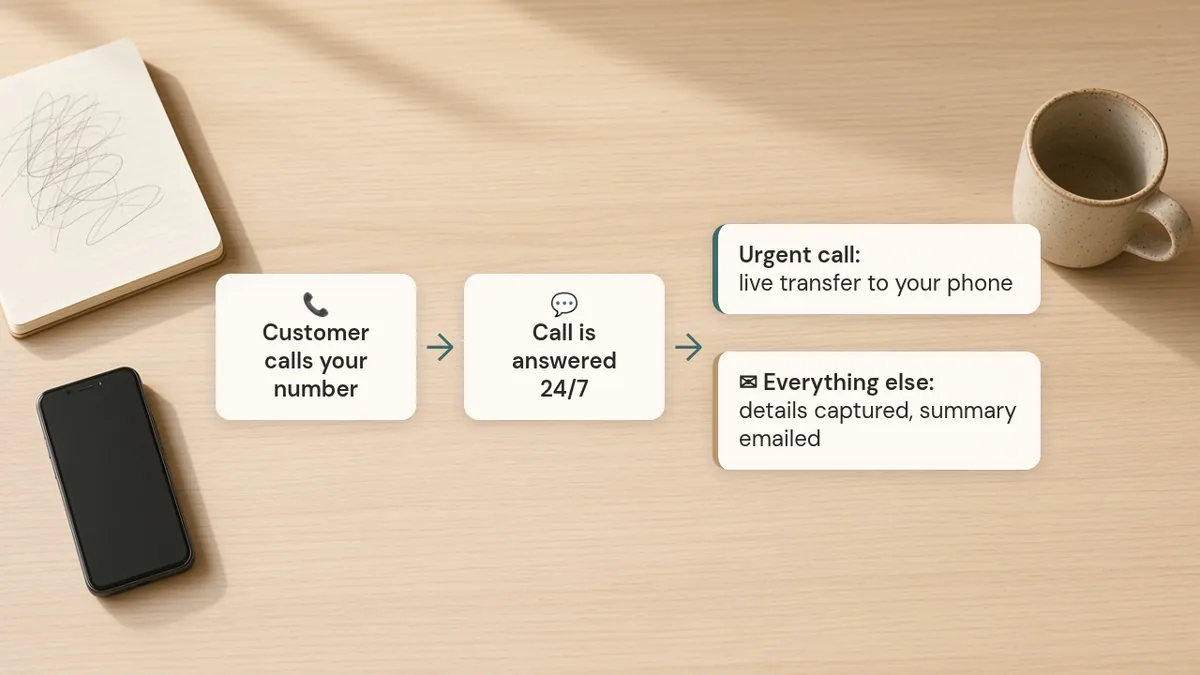
AI receptionist vs. human receptionist vs. answering service
There are really four ways to cover the phone. None of them is wrong. They fit different businesses.
| DIY AI software | Done-for-you AI service | In-house receptionist | Live answering service | |
|---|---|---|---|---|
| Who answers | AI | AI | One person | Live human agents |
| When it answers | Whenever your line forwards to it | Whenever your line forwards to it | During their shift | Depends on the service and plan |
| Who sets it up | You | The provider | n/a | The provider, with your instructions |
| How you pay | Monthly plan, by minutes, calls or unique callers | Monthly plan plus a one-time setup fee | Salary | Monthly bundle of receptionist minutes |
| Best for | Owners who like to tinker and want the lowest bill | Owners who want it built and tuned for them | Offices with steady walk-in traffic | Businesses that want a human voice on every call |
A couple of numbers to put that in perspective. The U.S. Bureau of Labor Statistics lists the median pay for receptionists at $38,010 a year (May 2025). That's pay alone, before taxes, benefits, or anyone covering sick days and nights.
On the live-human side, Ruby is one well-known example. Its published plans are sold in bundles of receptionist minutes, starting at 50 minutes a month, and Ruby lists bilingual answering. Human services like this can be a great fit if you want a person on every call. Ruby's minute-plan prices weren't shown on its page when we checked, so ask for a quote.
How to choose: 7 questions to ask any AI receptionist company
This is the part that matters most. Features sound alike on every website. These seven questions show you how the product really works.
1. Can it live-transfer calls to my cell, and which ones? Find out whether it transfers every call, only emergencies, or calls that match rules you set. Then ask what happens if you don't pick up. The answer tells you whether the caller gets help or gets dropped.
2. Does it speak Spanish? If some of your callers speak Spanish, this matters a lot. Ask whether Spanish is included or an add-on, and ask to hear it. A native-sounding voice and a stiff one feel very different on the phone.
3. How do I get the lead? Some products send a text. Some send an email. Some add a row to a sheet or push it to a CRM. Pick the one you'll actually look at.
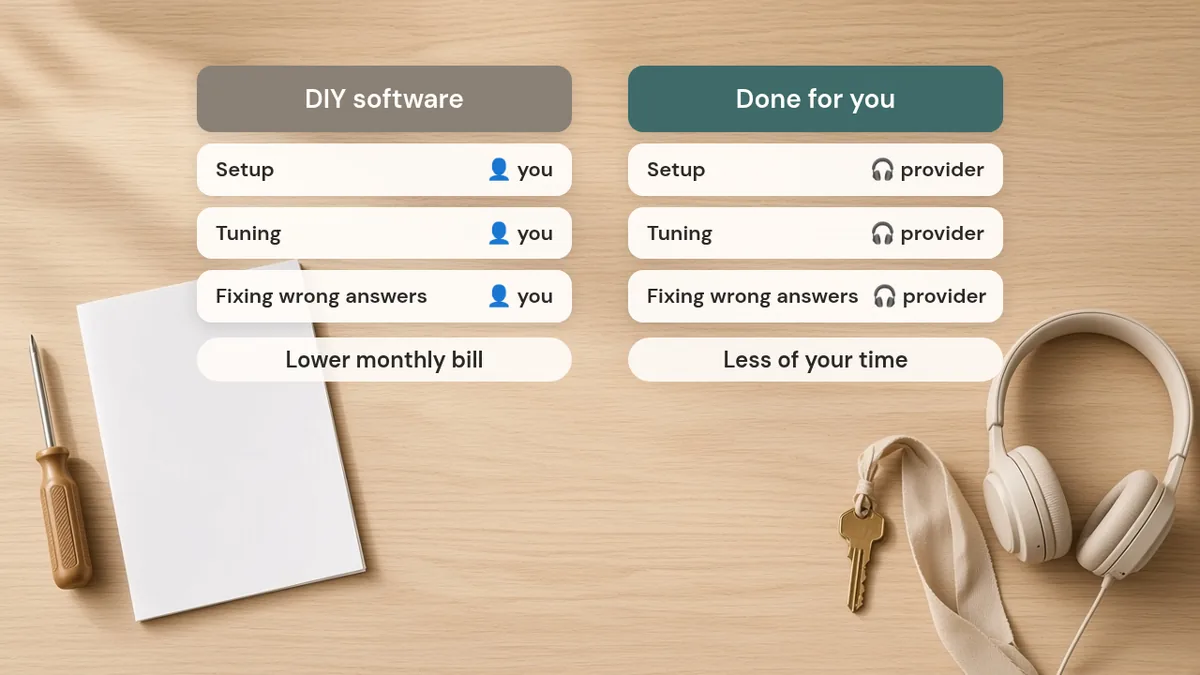
4. Do I set it up, or do you? DIY tools hand you the keys. Done-for-you services build it with you and tune it afterward. Ask who fixes it when it gives a wrong answer.
5. How is it billed? Some charge per minute, some per call, some per unique caller, some a flat rate. Ask what overage costs and what counts as a "call." This is where surprise bills hide.
6. Do I keep my number? You should. Most setups use call forwarding, so your customers keep calling the same number. That works even if your main line is a cell phone.
7. Does it say it's an AI? Good services tell callers up front. It's more honest, and it sets the right expectation from the first second.

Published prices: a few AI receptionists side by side
Prices below come from each company's own pricing page, checked on October 25, 2026 and re-checked October 26, 2026. Plans change, so check before you buy. Inclusion isn't an endorsement, and we didn't test these products. We list only what each company's page states.
Published prices, re-checked Oct 26, 2026
| Company | Type | Entry price published | What the company's page states |
|---|---|---|---|
| Smith.ai AI Receptionist | AI first, with live human backup | Free plan: $0/mo for 25 calls ($3.00 per call after). Pro: $150/mo for 75 calls ($2.00 per call) | Calls can be transferred to a live North America-based receptionist any time, day or night. Billed per call. |
| Rosie | AI, DIY | $49/mo, 250 minutes (Professional) | Live and warm transfers start on the $149/mo Scale plan (1,000 minutes), which also books appointments on your calendar. "English & Spanish on every call." |
| Goodcall | AI, DIY | $79/mo, 100 unique customers, then 79¢ each | Billed per unique customer, not per minute. Transfers never count. Keep your number with call forwarding. |
| My AI Front Desk | AI, DIY | $99/mo ($79/mo billed annually), 200 voice minutes | Lists 20+ languages. Call transfer is listed as one of the plan's agent actions. Includes web chat, 2-way SMS and CRM. |
| Upfirst | AI, DIY | $24.95/mo, 30 calls ($1.50 per extra call) | Call transfers listed on every plan. Lists 35+ languages. |
| Dialzara | AI, DIY or managed | $29/mo entry plan | Blind transfer on the $29 entry plan; warm transfer starts on the $99 Business Pro plan. Managed "Done for You" option from $1,500+/mo. |
| Gary (Viralux) | AI, done for you | Essential: $349/mo + $497 one-time setup (400 minutes). Pro: $597/mo + $997 setup | English and Spanish. Live-transfers the calls you choose (like emergencies) to your phone or an on-call partner. If nobody picks up, he takes the details and emails you a lead summary. Monthly report. Keep your number. Says up front that he's an AI. |
A few things jump out. DIY entry plans run from about $25 to $99 a month. There's even a free option if your call volume is tiny. Billing methods are all over the place: per call, per minute, per unique customer, per credit. And "transfer" can mean very different things depending on the company and the plan. That's why question 1 above is worth asking twice.
DIY software vs. done-for-you: which fits you?
This is the real decision, and it's more important than which logo you pick.
DIY software fits if you're comfortable writing your own FAQ, testing calls, and adjusting settings when something sounds off. You'll get the lowest monthly bill. The cost is your time, plus the learning curve, and you're the one who notices when it gives a wrong answer.
Done-for-you fits if you'd rather answer jobs than configure software. Someone builds it, tests it, and tunes it for you. You pay more per month, and you pay a one-time setup fee, because a person is doing real work.
Gary is in the done-for-you camp. Plans start at $349 a month plus a $497 one-time setup (Essential, 400 minutes). We're not the cheapest, and we won't pretend to be. If you want the lowest bill and you like tinkering, a DIY tool from the table above may be the better buy.
Where Gary fits
Gary is our done-for-you AI receptionist. Here's what he does:
- Answers 24/7 in English and Spanish, with a native-sounding Spanish voice, and tells callers up front that he's an AI.
- Live-transfers the calls you choose (for example, emergencies) straight to your phone or an on-call partner.
- Takes the details if nobody picks up. He gets the caller's name, number and job details, then you get an email summary and a new row in your Google Sheet.
- Keeps your number. You forward your existing line, so nothing changes for your customers.
- Comes with the extras: a text transcript of every call, a monthly report, and setup and tuning done for you.
We back the setup with one guarantee: live in 7 days, or your setup fee back. If Gary isn't live and answering correctly within 7 days after you turn on call forwarding, the setup fee is refunded in full.
We also don't have Gary client results to show yet, and we'd rather say so than make something up. The best way to judge him is to hear him. Call the demo line at (469) 482-5580 and Gary will answer.
Frequently asked questions
Is an AI receptionist worth it for a small business? It depends on how many calls you miss and what a missed call costs you. If you're often on a job site or off the clock and your customers call for urgent work, it can be worth it. If your phone rarely rings, a cheap DIY plan or even voicemail may be enough.
How much does an AI receptionist cost per month? From the published prices above, DIY plans start between about $25 and $99 a month, and Smith.ai lists a free plan for low volumes. Done-for-you service costs more. Gary's Essential plan is $349 a month plus a $497 setup. Live human answering services like Ruby are sold in bundles of receptionist minutes, so ask for a quote. Prices change, so check each company's page.
Is there a free AI receptionist for small business? Smith.ai's page lists a free plan with 25 calls a month, with calls after that billed per call. That can work for very low call volume. Check the page for what's included before you rely on it.
Will callers know it's an AI? Good services tell them. Gary does, up front.
Can an AI receptionist transfer calls to my cell phone? Many can, but the details differ. Some transfer every call, some only certain calls, and some put transfers on higher plans. Ask exactly which calls transfer, and what happens if you don't answer. Gary live-transfers the calls you choose, such as emergencies, to your phone or an on-call partner.
Can I keep my business number? Yes, with most setups. You forward your existing number to the service, so customers keep calling the number they know. That includes cell phone numbers.
What's the difference between an AI receptionist and a virtual receptionist? "Virtual receptionist" usually means a live human who answers remotely. An AI receptionist is software that answers with a voice. Some services combine the two, with AI first and a human backup.
Ready to hear one before you decide?
We think the best way to choose is to listen. Call the demo line, (469) 482-5580, and Gary will answer.
If you'd rather talk to a person, call or text Jared at 801-614-3820, or book a free consultation. We'll tell you straight whether Gary fits your business or whether a cheaper tool makes more sense. You can also ask for a free missed-call audit.
Once the phone is covered, the next question is where the calls come from. If you're thinking about ads, here's what Facebook ads cost, and what a free ad audit checks.
Viralux Advertising, Treasure Coast, Florida.